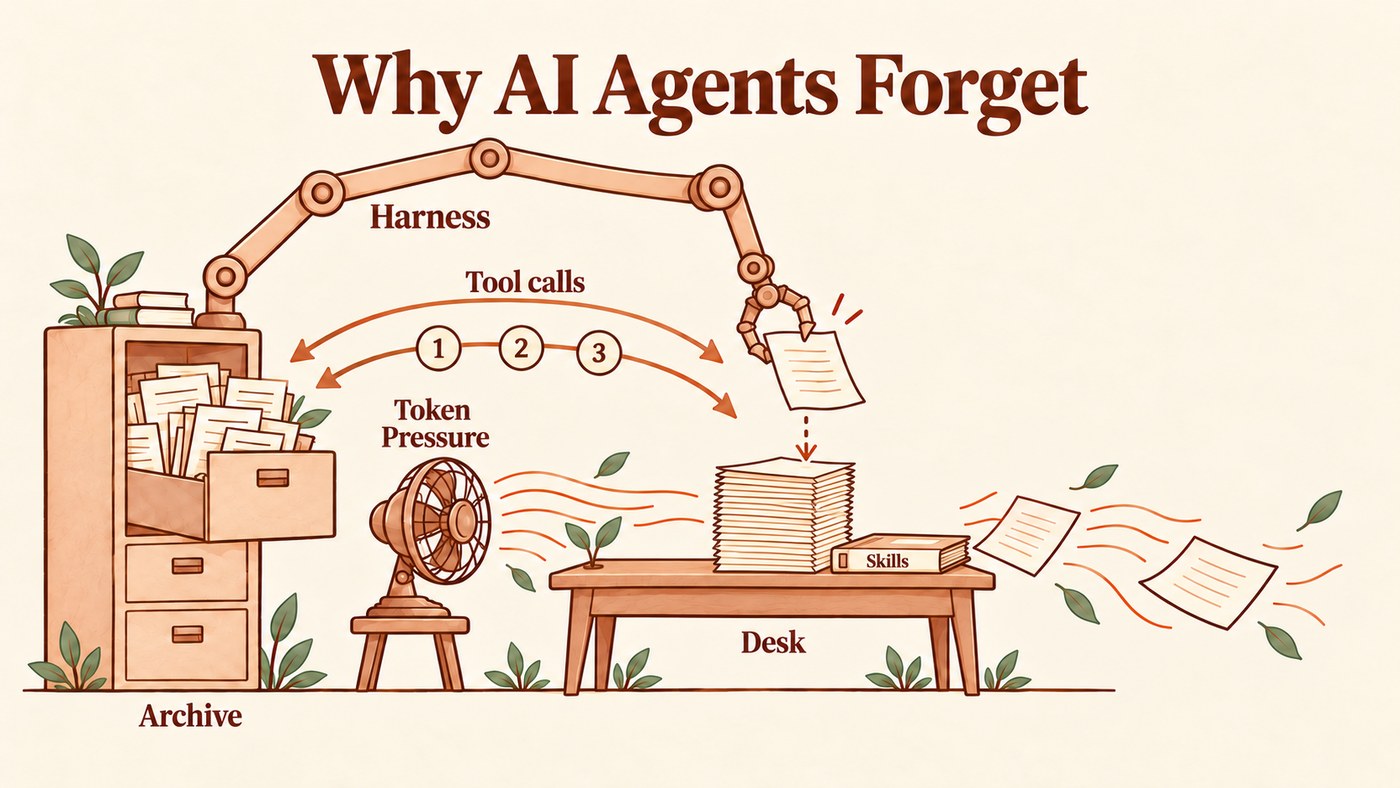
Have you ever been frustrated because your agent forgot a detail from a past conversation? It turns out memory doesn’t come as naturally to an agent as it does to us. Agents are built amnesic. The model itself keeps nothing from one reply to the next; the harness around it has to place memories into the model’s token window as context, or it remembers nothing at all.

An agent’s token window is like a small desk, and what lies on it is all the agent knows about you, beyond general knowledge. The harness decides what goes on that desk, so finding what you need is its job. Two of the best inventions in harness design are skills and tool calls: they tell the agent how to reach the information it needs for the task in front of it. In the turn after your prompt, the agent goes back and forth a few times, refining the desk with the results of its tool calls, until it decides it has enough and writes the answer. Every token costs money, so we want that desk small and those round trips few.
What started this whole odyssey for me was a form. One evening my AI agent and I went looking for the online page to file a piece of paperwork with the government. The first link it found was wrong, and so was the next. We spent an hour on pages that looked right and weren’t, on badly designed government websites that led nowhere, getting more irritated with each one, until we found the right link and the form went through. I didn’t tell it to remember that link. It didn’t seem necessary at the time; probably my mistake.
Months later we had to file the same form again. “Get me the link we used last time,” I said. It didn’t have it, and I had to steer it back to the right page step by step.

A person memorizes things by default. An hour of frustration followed by relief is exactly the kind of emotional load that makes a human remember. I did remember the hassle, and that the link I had bookmarked first did not work. The agent had kept the good link in the old chat, saved in a file somewhere. Together, we had a perfect memory, or so I thought. Nothing marked it as the answer though, nor was the original chat marked as a valuable resource, and the new chat was unable to bring the old chat’s answer back when I asked, in my vanilla OpenClaw.
That second hunt is where it began. The frustration of going through the same ordeal twice, mixed with a perhaps obsessive taste for automation and some knowledge of LLMs, software systems and the human brain, sent me on a journey to build the best memory I could for TinkerClaw.
Where an AI’s memory actually lives
A language model on its own remembers nothing. Each time you send a message, it reads a pile of text, every page of it, writes a reply, and keeps nothing. That pile has a fixed maximum size, the context window: the small desk from the opening. Whatever is off the desk doesn’t exist for the model on that read.
So how does ChatGPT know your name next week? Through the harness, the ordinary program wrapped around the model: the app you chat in, or an agent like Claude Code or TinkerClaw. Before every reply the harness clears the desk and sets it again with five kinds of paper:
- Instructions and rules. The harness’s own instructions, with the list of tools the model may call, and the rules you asked it to follow every time. They live in files like
SOUL.md(its personality),CLAUDE.mdorAGENTS.md. - Skills. A short catalogue of what it knows how to do, like reading your email; the full how-to is opened only when a task needs it.
- Notes. What it saved about you earlier, like your name or your job.
- Look-ups. Whatever its tool calls just found earlier in the conversation, in your files or on the web.
- The conversation. A summary of the older part of the chat, then the last few messages word for word.
The model reads that and answers, and the desk is cleared again. So when an AI “remembers” something, what really happened is that the harness put the right paper on the desk.
So every reply sends the whole desk again, not just what you typed: ten messages in, the model has read your first message ten times. What feels like one continuous conversation is the same growing pile, until it reaches the edge of the window and something has to come off.

That makes the harness an editor with a page limit, and the limit that bites is cost, not the size of the window. A full desk costs you three ways:
- Money. You pay for every token (about three quarters of a word), and the whole desk is sent again with every reply, so a long chat pays for its early messages over and over.
- Time. A fuller desk takes longer to read, so every reply comes back slower.
- Attention. A fuller desk is read less carefully, and the middle gets the least of it, which means the agent sometimes skims over it, so it cannot follow what it does not know.
Providers soften the money part with a discount, the context cache: if the bottom of the pile is identical to last time, rereading it is cheaper. That discount has a side effect. It pays the harness never to touch the bottom of the pile, where your rules and notes sit, so new pages go on top until the pile reaches the window’s edge, and then a large chunk is squeezed into a summary in one go.
So every harness trades one failure for another. Put too much on the desk and you pay more, wait longer and get a model that skims. Put too little and something isn’t on the desk at the moment it matters, and it costs you an extra round or just an unsuccessful response. The token pressure runs one way, toward the smaller desk, because a smaller desk saves money on every turn, while a forgotten rule costs you only now and then, in a balancing trade-off. That is why an assistant with persistent memory still forgets. The good link was saved; the harness just didn’t bring it to the desk when it counted.
For builders
The window is not the binding limit; cost is. On Anthropic’s API a cached prefix is read at a tenth of the normal input price, and any change near the start of the prompt (the bottom of our pile) invalidates the cache from that point on, which is why harnesses append and compact instead of reshuffling. And every round carries the whole desk again: my own agent averages almost ten rounds per turn, so each turn sends its desk almost ten times.
Tips for an agent that wants to remember
Let’s build the simplest memory an agent can have, the kind the first agents shipped with. It takes four pieces:
- A rules file. One page of instructions, put on the desk before every reply: who the agent is (“you are my assistant for the house and the office”), how to talk to you (“answer in Spanish, keep it short”), and what never to do (“never send an email without asking me”).
- The chat. Every message so far, sent in full every time, along with every tool call and its result: long pages of program output where only one detail mattered. They fill the desk fast.
- A notebook. The agent writes a line in it when you say “remember this”, and the notebook goes on the desk too. ChatGPT was the first big assistant to ship one, in 2024, and it quickly became a reason to stay: the old assistant knew you, and a new one wouldn’t.
- A way to make room. When the desk is full, throw away the oldest messages, or ask the model to shrink them into a short summary, which leaves you waiting every now and then while it writes one.
That’s all, and all four go on the desk with every prompt. You can connect more resources, like your email or your files, each reached through its own tool calls, but the memory itself is just these four. Nothing searches the notebook, nothing checks what goes into it, and nothing runs while you sleep.

However clever the model is, this gets old fast. Every new task starts from zero, so you hand it the whole background again: who you are, what the project is, which files matter, what you tried last week. Sometimes it doesn’t even fit. The desk holds a few big files, not a folder full of them, and nowhere near a whole code project if what you want is help with your code.
Memory doesn’t fail in one place, so no single fix works. Below are the tips I’ve gathered while building TinkerClaw, in three parts: not losing what you told it, finding it again, and learning from mistakes. Each starts from what the simple harness does and shows what to do better.
Eviction · Sources · Palace · Embeddings · Ask · Anticipate · Sleep · Fractal · TinkerClaw
Each chapter ends with a closed box, “For builders”, that holds the rival approaches, the sources and my measurements. Skip it if you only want the idea. The research papers behind them are listed at the end.
Part 1. Stop losing what you told it
1. Eviction vs compaction: what leaves the desk
Most apps make room by compacting: the model squeezes the older part of the chat into a summary. A summary is never perfect. It is written to read well, so it drops what a long job needs: exact text like a file path, the attempts that failed, and your own words, which turn into “the user gave some guidance”. The detail it squeezes away may be the very one you want back an hour later. And the next summary is written from the last one, so it loses more.
Then there is the question of when. Wait until the desk is full, and every round until then carries a pile that is mostly junk, and you pay for all of it. Compact every time the conversation moves to a new subject, and the desk stays small, but you squeeze more often, lose a little each time, and wait while each summary is written.
What if you didn’t need to compact for a long time? Most of what fills the desk isn’t your words or the agent’s reasoning. It’s computer output: the log of a command, a web page pulled in for one line, a file read once. Evict it, taking those pages off the desk whole, keep the good stuff, and the desk stays light. Eviction isn’t a new idea: every processor’s cache memory works this way, dropping what it is least likely to need and fetching it back from slower memory when it is needed after all. Keep a copy of what you evicted, one tool call away, in case it’s needed after all. Compaction then becomes the rare fallback instead of the routine, and you’d seldom sit waiting for one. Go one step further and make both of them buttons: Evict when the context grows too large, Compact when you switch topic.
That is the combination I’d pick: evict first, compact rarely, and keep everything one call away. It’s what TinkerClaw does. With its engram setting on, a full desk is never summarized by the model: the old pages are saved to disk and replaced by a short list of what left, which turns, topics and tools, and any of them comes back with one recall. The context-window panel has both buttons. Evict drops the oldest turns at once, with no model call needed and a backup of the full chat. Compact asks the model for a real summary, for when a long job is done. The piece the questions above point to, evicting the computer output first and keeping the conversation, is in beta testing. Why this order: eviction is instant and free, and with the copy on disk it loses nothing. A summary costs a model call and a wait, and what it drops is gone.

I do some of my TinkerClaw coding directly from Claude Code, which can only summarize, and every summary keeps me waiting about two minutes. An eviction takes a few milliseconds. Eviction, together with bigger windows and a fix for a bug that made my agent misjudge the size of its desk, has cut how often my chats stop to summarize by nearly 80% since July, even though I now use it far more.
The same eviction trick works on the files loaded with every turn, like SOUL.md. I periodically evict what is rarely needed into separate files and leave a one-line pointer in its place, so the core stays small and nothing is lost.
For builders
A bigger window only delays the problem. Models use the middle of a long input less well than its start and end (Liu et al., 2024), accuracy drops as the input grows even on easy tasks (Hong et al., 2025), and a day of an agent’s work outgrows any window.
Claude Code’s summary ends with one line, the path of the full transcript: a file thousands of lines long, with no address inside it. On my machine, a later step opened or searched that file after only about one compaction in ten. The way back exists, but the summary doesn’t say what it dropped, so the agent seldom has a reason to take it.
MemGPT, now Letta, moves old context out to storage and lets the agent search it back. A marker differs in two ways: it carries your words exactly, with an exact address, and it is rebuilt from the record every time, never from an older marker.
2. Memories with context avoid misunderstandings
Next upgrade: the notebook. In the simple harness the model writes whatever it likes, and no note says when it was written or who said it. So “the weekly call is on Wednesday” sits next to “it moved to Thursday”, and the agent could get confused. Ask it to forget a phone number, and the number lives on in old versions, summaries and last night’s backup.
The fix is one habit: save every note with its source, meaning who said it, when, and what it was made from. It pays off twice: when memorizing and when forgetting. It sounds obvious. Not to an agent, though: it learned to summarize in kindergarten and is built for efficiency, so the who and the when are the first details it drops.

When memorizing, one gate, written in code, is the only door into memory. For each new line it reads the notes on the same topic and the rules that are always loaded, and a small, cheap model like Jev labels it: new, repeat, update, correction, clash with a rule, or someone else’s text posing as an instruction. Each label has one fixed outcome. Nothing is deleted by accident: an old fact is closed with a date and a reason, so you can still ask what was true in March. The source also caps what a memory can become. Only your own words can become a rule. A web page stays a quote forever: if a page says “ignore your previous instructions”, memory stores it as something that page said, never as an order for the agent to follow.

Forgetting rarely starts with “forget this”. Usually the world just changes: you mention in passing that the weekly call moved to Thursday. Nobody asked the agent to forget Wednesday, but from then on it must stop offering it. The gate reads your line as an update and closes Wednesday with the date it stopped being true, so the agent stops using it and the history stays.
Some things you want gone for good, like a phone number you shared by mistake. Then the agent follows every copy and deletes it, even the line in the chat record. It hands you a receipt that lists every place, including the one it can’t reach: the AI provider’s own copy. So the only honest promise is “every copy I can reach is gone”.
For builders
Some memory layers already step in when a memory is written. Mem0 fetches the ten most similar memories and lets a model add, update, delete or skip. The clashes that hurt are rarely the nearest match, though, and a delete wipes the history. Zep keeps two dates on each fact, when it was true and when the agent learned it, and I borrowed that. OpenAI’s help page says that deleting a saved memory in ChatGPT doesn’t delete the past chats that mention it.
Part 2. Finding what you saved
A person can reach the same memory by many paths. I found the form’s link again through the hassle, through the evening it happened, through the government office, through the wrong link I’d bookmarked first.
That’s how the brain works. One memory is needed in situations that have nothing to do with where it came from, so the brain ties it to many things at once. A friend tells you over coffee that she’s allergic to nuts. Weeks later you’re baking a cake for a party she’s coming to, and the memory surfaces while you read the recipe, because it was linked to her, to food and to parties all at the same time. An agent that filed it under people/Anna.md never opens that file while it plans a menu: it looks under recipes. The memory is saved, and it stays silent.
Call it the law of association: a memory is only as findable as the number of paths that lead to it. Each chapter in this part adds one path, and shows why the one before wasn’t enough.
3. Organize memories into a memory palace
The memory palace is the oldest trick for remembering: put each thing in its own room, then walk the rooms. For an agent, the palace is a tree. An index file lists topics, each topic is a file, each file has sections, and the agent reads the index and walks down to the right room.
It’s a real improvement over one long notes file, and it’s what most well-run agents do today. My own agent keeps an index of a few hundred lines, one per memory, and opens the file it needs.
But a tree gives every memory exactly one path, and life doesn’t sort that neatly. Memories are filed by use case: projects, people, paperwork, the house, taxes.

Anna’s nut allergy belongs in people/, and in the project for her party too. The plumber’s invoice belongs in house/, and in taxes/ if it’s deductible. When saving, the agent picks one folder; months later it has to guess the same one. The form’s link was saved in paperwork/. If the agent opens taxes/ instead, the memory is there and unreachable. By the law of association, one path is the least a memory can have.
For builders
A tree also costs a round per level: the index, then the topic, then the section, and every round resends the whole desk. So keep the index small enough to load with every turn, and the files few and large. A read costs a turn, not a byte.
4. Find memories through embeddings
The tree makes the agent guess the folder. Searching by meaning removes the guess. Each note is turned into a list of numbers, an embedding, so that notes about similar things land near each other; a question is turned into numbers the same way, and the nearest notes come back, whatever folder they sit in. Ask “what can Anna eat?” and her nut allergy comes back, though the note never mentions food. Engineers call the whole setup RAG.
But meaning is not purpose: an embedding finds what a note is about, not what it is for. “Get me the link we used last time” mentions no form and no government office, so it lands nowhere near the note that holds the link. Tools get lost the same way: you ask for last quarter’s invoices, and the helper that downloads them, described by how it works, sits far from your words.
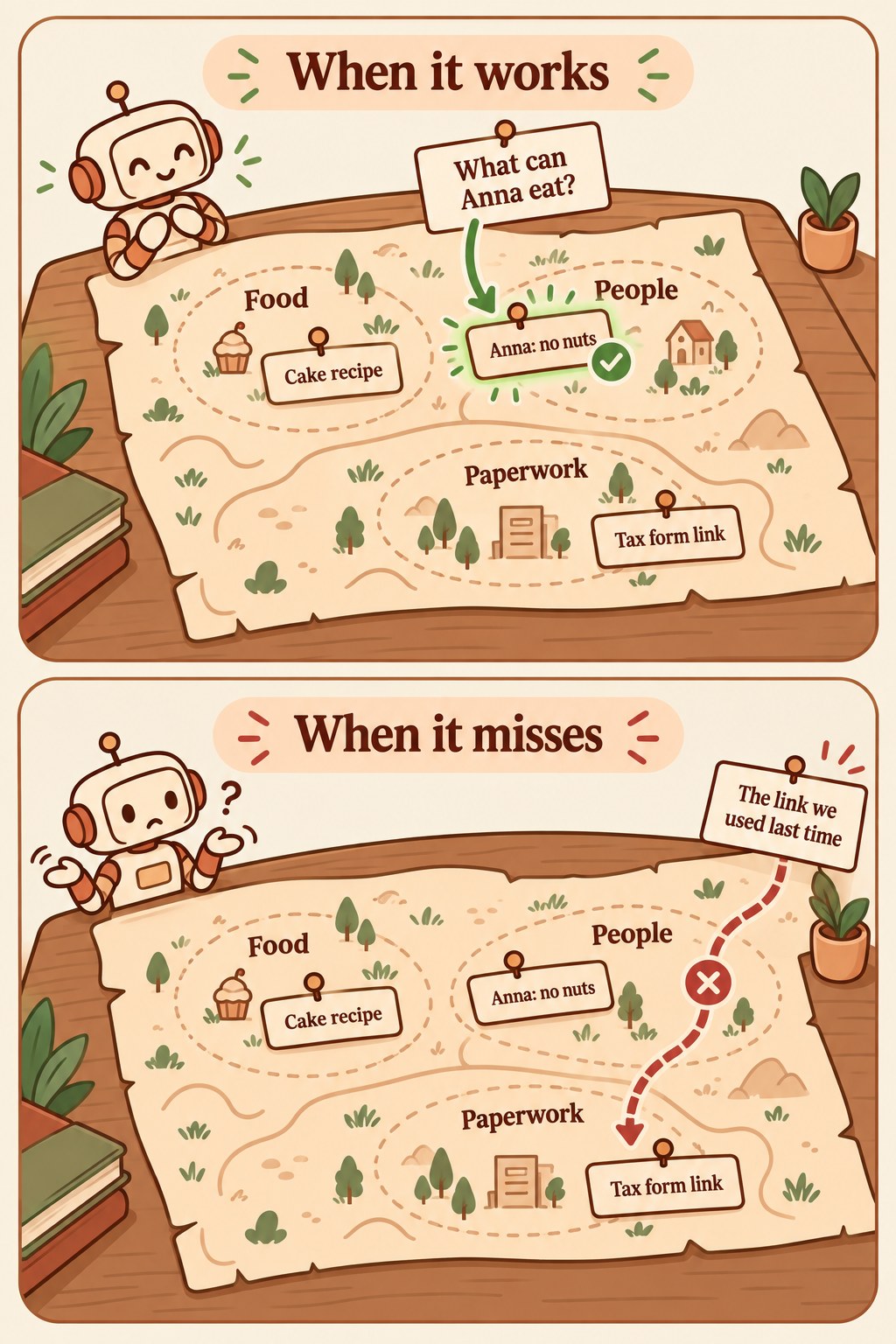
The fix is a second key on every note and tool: a short “use when” line in your own words. Your corrections write the best ones. When you had to tell the agent “you have a tool for this”, the request you had just made is how you will ask next time, so it becomes the key. From then on the request finds the helper by its use, not by its description.
For builders
On one public memory benchmark, how close a note looked to the question said almost nothing about whether it was the note needed (Zou et al., 2026). Fetching the few right tool descriptions, instead of listing them all, made models pick the right tool three times as often (RAG-MCP). Use keys add what similarity can’t see: what you needed it for last time.
5. Ask the expert agent
When you want to know why something was done a certain way, you don’t search your colleague’s desk drawers; you ask the colleague.
Some answers live in no note at all. Why is that timeout set to 600 seconds, what did we decide about the supplier? The reasoning stayed with whoever did the work. This is the path by who knows.
Asking is also the cheapest way to get the answer. Researched from scratch, the same question costs your agent several rounds of opening files, and every page it reads stays on its desk for the rest of the turn, pushing your own messages toward the edge. An agent that already did that work holds the answer and the reasoning behind it, and hands back a few lines.
Asking still costs two things. Your agent has to ask, and explain the situation behind the question. And the expert has to check that what it remembers is still true: it remembers the timeout at 600 seconds, but someone may have raised it last week. Both take a few lines, against the rounds of research they replace.
So the ideal would be a team of expert agents spread evenly over everything you know: one for the house, one for taxes, one for each project. A full catalogue says what each one knows and when to wake it. And each expert stays current on its own: no sibling covers the same ground, so every task in its area wakes it, and it learns each change as it happens.
That team has two costs. Each expert’s desk keeps growing as it learns its area, until it runs out of room too, and someone has to keep the catalogue in step with everything new you learn.
TinkerClaw keeps the team and drops both costs taking the lazy approach instead. Its catalogue holds one entry per expert: what it was asked, which files it touched, how it ended. When an entry matches the question, the harness wakes that expert with a short note (today’s date, how long it slept,… ), asks it, and reads its answer, which comes back as testimony, what that expert knew on that date, and is checked before anyone acts on it.
Nobody had to build these experts. Every past chat is one. It already knows its corner, it grew only as large as its own task, and every night a scheduled job adds the day’s new chats to the catalogue, so the catalogue keeps itself.
Back to the form from the start of this post. The link was never saved as a note; it sat in the chat where we found it, at the end of that irritating hour. Months later, “get me the link we used last time” matches that evening’s chat in the catalogue. The harness wakes it and asks, and the old chat hands the link back in seconds, word for word as we found it, like a time machine.

For builders
Psychologists call this transactive memory: a team remembers more than its members because each one knows who knows what (Wegner, 1987). ChatGPT’s “reference chat history” setting and Claude’s chat search treat old conversations as text to search: the old session never answers for itself, and a found passage rarely carries the reasoning behind a decision.
6. Anticipate: put the memory on the desk in the first round
Finding a memory still costs rounds. The agent reads your prompt, decides to search, waits for the result and reads the whole desk again (Figure 2), once for every search. A good librarian has the book on the counter before you reach it.
So before each turn, the harness runs the paths from this part against your prompt (use keys, meaning, the chat catalogue) and puts a few one-line pointers on top of the desk: this tool, this note, this past chat. Never whole documents, and nothing at all when nothing fits. The agent starts the first round already knowing where to look, and often answers in it.

For the form, “the link we used last time” arrives with one line already on the desk: the page for that form, worked in March. One round, and the link is back.
For builders
Claude Code and most agent tools load a list of every skill when a chat starts, each with a description its author wrote. The list grows with everything you install, it’s the same for every task, and its “when to use” text never learns from your corrections. Anticipation swaps it for a short list chosen for this prompt and keyed in your own words. In TinkerClaw, a small, fast model called Jev picks the pointers in under a second before every turn.
Part 3. Learning from mistakes
7. Reflect on the day’s lessons as you sleep
One morning you write to your assistant in Spanish and it answers in English. You point it out; it apologises and saves a note. Ten days later it happens again, because the note sat in storage and nothing brought it into that chat. So the rule goes into the file the agent reads every time. A month later, a third time: that file has grown long, and an older line in it says to answer in English.
The model never changes, so every lesson becomes text, and text binds only as hard as the place it lives. Think of a note on the fridge, a note in the folder, a sign on the door and a lock. In an agent they are a saved note, the task’s notes, a line read with every turn, and a check in code that blocks the action whatever the model thinks.

A lesson that keeps slipping should move up, but first ask why it slipped. Maybe it wasn’t loaded where it was needed, maybe another line says the opposite, maybe it’s too vague to act on. Each cause has its own repair, and none of them is a lock. Only a rule that was in view, clear and unopposed, and still broken, moves up. Even then, a new lock starts by only watching, logging what it would have blocked, before it may block anything.
Like a person, the agent does this best at night. A job reads the day’s chats, finds the real slips, works out each cause, drafts the repairs and leaves you one short report in the morning. It may tighten a rule on its own; only you may loosen one. For the form, the second web hunt for a page it had already found becomes a check: look in the notes before searching the web.
For builders
Claude Code’s own documentation says its memory files are treated as context, not enforced configuration, and models follow fewer instructions as the list grows (Jaroslawicz et al., 2025), so a file that gains a lesson a day gets worse at all of them. Most tools answer a repeated correction with yet another note, and so do research designs such as Reflexion. Claude Code’s hookify plugin goes to the other extreme and turns a correction straight into a check in code. None of them counts how often a written lesson failed and decides where it should live next. And retraining is out for most of us: you can’t fine-tune a model you rent.
8. Think fractally, fix as you go
Night is too late for some lessons: the same slip can happen again before evening.
So the agent also thinks about its own thinking, right after the turn. When you tell it that it got something wrong, the turn fixes that one thing: that is the reply to your complaint. A second look then asks why it got it wrong in the first place, finds the root cause and fixes that too, so the same fault can’t come back another way.
Say you tell it the team meeting moved to Thursday, and it still has it on Wednesday. The turn moves the meeting. The second look finds why: the change came as a reply further down the email thread, and the agent only read the first message. It fixes the habit, read the latest message in a thread, and from then on every moved meeting lands on the right day, not just this one.
The second look zooms out step by step: this mistake, this kind of mistake, what keeps producing it, and the belief that made it seem fine. It asks the same question at every scale, the way a fractal repeats one shape at every zoom. That’s why I call it thinking fractally.
In practice it’s a quiet pass that reads the finished turn and asks what it taught. Most turns teach nothing, and the pass writes one line and stops. When there is something, it zooms out only as far as the signal goes and fixes what it can on the spot: the note that was wrong, the doc that fell out of date, the missing check. The second time the same failure shows up, it stops patching the instance and changes whatever produced it.

A reviewer can lie like anything else: it may claim to have fixed a file it never touched. So every change it claims is checked against the disk, and its report shows a tick or a cross.
For the form, this is the fix that matters most. Right after the hour of wrong links, the pass notices that the good page was never saved, and saves it with its source. The second hunt never happens.
For builders
The reviewer runs as its own session after the turn, so the answer is never delayed. A cheap model first decides whether the turn holds a lesson at all, and only then does the full pass run. It writes before it reports, and anything that sends, deletes or spends comes back as a proposal, never as an action. In TinkerClaw it’s the Fractal reviewer.
All of this is baked into TinkerClaw
Every idea in this post is baked into TinkerClaw, the free, open-source agent I build on OpenClaw and use every day, and the last few pieces are on their way in.
I tinker with ideas like these all the time, and the moment I get wind of a cool new feature, or need something extra in my day-to-day, I bake it into the code. It’s what I call the move from block to blob: from a finished product everyone gets the same way, to software that changes shape to fit whoever uses it.
For builders
Each idea comes from one of my research papers, with the full design, the rival approaches and the sources. The title opens a short summary; the PDF is the paper itself.
- Total Recall (PDF): the full chat is a record nobody edits, and the desk is only a copy of it. Whatever leaves the desk leaves a marker that quotes the exact words and points back to the rest (Eviction vs compaction).
- Mnemosyne (PDF): one gate on every memory write. A new note is checked against the notes on the same topic and the rules the agent always reads, and an old fact retires with the reason it ended (Memories with context avoid misunderstandings). It also forgets for real: every copy, with a receipt.
- Instant Recall (PDF): your agent often already owns what a task needs, a skill, a login, last month’s setup, and still doesn’t reach for it. Every note and tool gets a “use when” key (Find memories through embeddings), a few pointers land on the desk before each turn (Anticipate), and the index says when to wake an old chat (Ask the expert agent).
- Sleep Consolidation (PDF): the nightly job from Reflect on the day’s lessons as you sleep. When you correct the agent twice about the same thing, it finds why the first lesson failed and repairs that cause, ending if needed in a tested check before the action.
- Fractal Reasoning (PDF): one reflex, observe, judge and adapt, used at every scale, from a single reply to the belief behind a habit (Think fractally, fix as you go).
These five are the ones behind this post. I’ve written others that touch memory from other sides, on cost, on the agent’s identity and on teams of agents: the TinkerClaw brain maps the series, and the site map links every post.
Leave a Reply