Have you asked an AI to help with an article, got a full draft in twenty seconds, and then spent the whole afternoon fixing it? The writing was fast; the editing ate your day.

Most of that afternoon goes to telling the AI where things are. “The second paragraph under the heading, the sentence that starts with ‘However’.” It fixes that sentence and rewrites the one next to it without telling you. And when you finally have a version you like, a reader still smells the machine in it and stops reading.
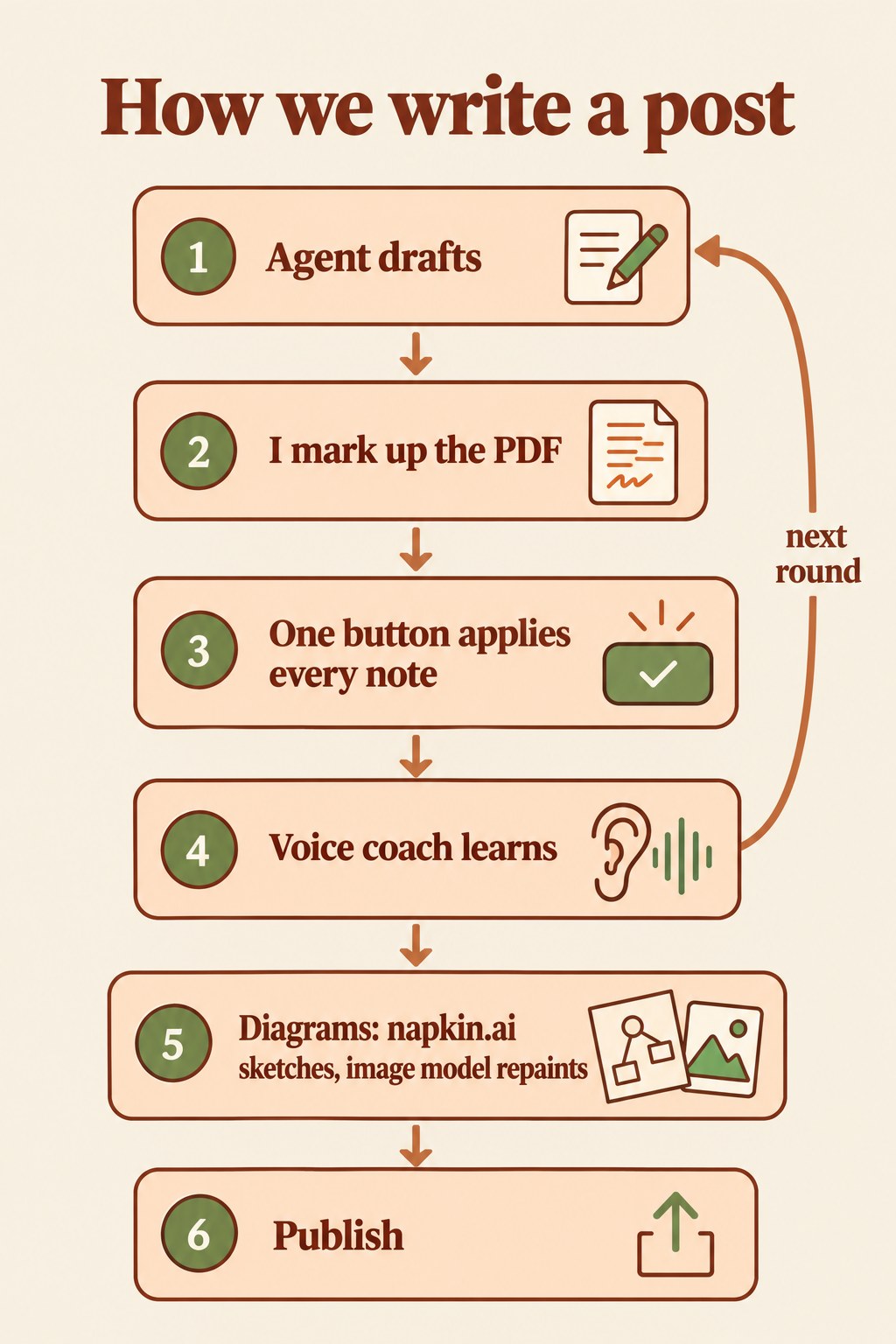
I lived this on one of our posts: it took 39 rounds of review before I was happy with it. What fixed it was not a better prompt but a better workshop. Three changes made the difference, and all three now run inside TinkerClaw, the AI agent I tinker with.
Mark it up like paper, and the agent applies every note
Describing a place in a text is slow and error-prone, for you and for the AI, while pointing at it takes a second. An editor doesn’t write you a letter about page four; she takes a red pen to page four.
So the draft no longer arrives in the chat. It arrives as a PDF in our own viewer. I read it like a printed page, highlight the words I don’t like and type a note next to them, the way I would in the margin. “Explain this better.” “Too long.” “Start each bullet with a bold title.” When I reach the end I press one button. The agent reads every note together with the words it points at, edits the source, rebuilds the PDF and reloads it in the same window, right where I was reading.

A whole round of edits now takes one press. And because each note sits on the exact words it means, the AI stops guessing which sentence I meant.
A voice coach that learns from your red pen
Readers have learned to spot AI writing, and not only by its words. They notice the payoff announced and never delivered, every paragraph the same length, the polite summary at the end that adds nothing. A better prompt hides some of this for a while, but it comes back, because the model drifts back to how it was trained to write.
So every text Jarvis writes for a person goes through a skill we call human-voice. It is a set of writing rules plus a checker that flags the tells real readers catch, in English, Spanish and Catalan. Think of it as a voice coach who reads every draft before I do.
The part that matters is that the coach keeps learning. When I flag a phrase as “too AI”, it goes onto the checker’s list the same day, so the next draft can’t use it. Every night, while I sleep, Jarvis rereads the day’s longest back-and-forths and looks for the belief behind my corrections, not just the corrections themselves. One evening, a short note I sent to a stranger took ten rounds to get right. Read together, the corrections said one thing: before you try to persuade someone, work out what drives that person. That sentence is now the first rule of the skill.

That is how the 39 rounds paid off: my 51 margin notes on that one post became 14 writing rules, and every draft since starts from them.
Diagrams that explain, all in one house style
A good figure saves a reader a page of text, but figures are where AI help usually falls apart. Image generators misspell labels, drawing by hand takes hours, and figures from different tools look like they came from five different magazines.
We split the job in two, the way an architect and an illustrator would. First, napkin.ai reads the section and lays out the idea: the boxes, the arrows, what leads to what. It is very good at layout and has no taste for colour. Then an image model like Google’s Nano Banana repaints that sketch in our brown workshop palette, keeping every label exactly as it was. Last, every label gets checked by eye, because a misspelled word on a figure is worse than an ugly figure.

Every figure in this post was made that way.
All of this is baked into TinkerClaw
Each of these pieces lives in TinkerClaw, my fork of OpenClaw. I tinker with ideas like these all the time, and the moment I get wind of a cool new trick, or need something extra in my day to day, I bake it into the code. The voice skill and the two diagram skills ship with the repository today; the review viewer and the nightly learning pass are on their way in.
If you want to see where this habit of building your own tools leads, I wrote about it in from block to blob.
For builders
- Sleep consolidation (PDF): how a nightly pass over the day makes an agent better over time; it is the idea behind the night shift in A voice coach that learns from your red pen.
- Fractal reasoning (PDF): reflecting after each task, from the single mistake up to the belief that caused it; it is how a day of corrections becomes one rule in A voice coach that learns from your red pen.
There are more papers behind TinkerClaw, on memory, security and how the agent picks its models. You can find them by topic on the brain map and the site map.
Leave a Reply