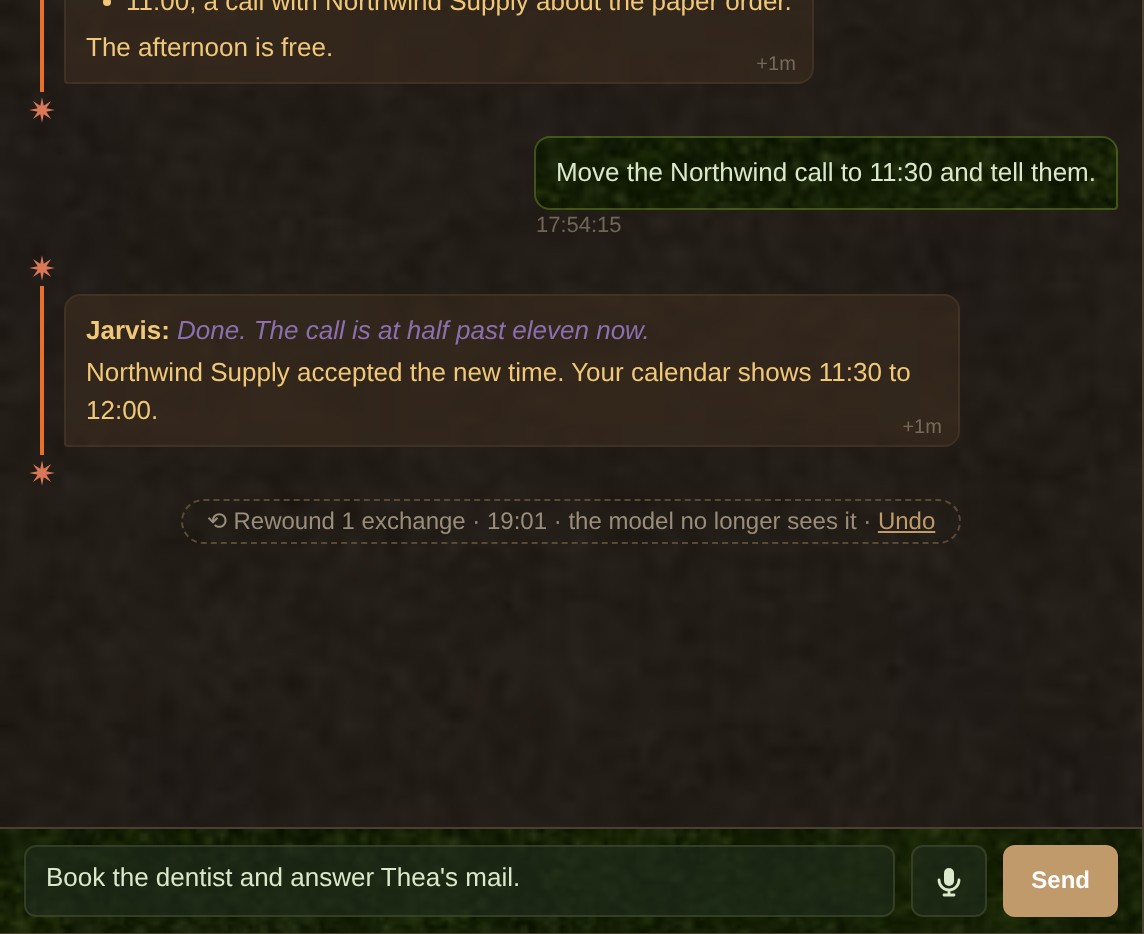

You asked your agent one question badly, and it took the wrong road. It read “per box” where you meant “per pallet” on the Northwind Supply quote, or it decided that a question about Dr. Hale’s report was medical advice and refused. You correct it. The next answer is better, and the one after drifts back, because the wrong turn is still in everything the model reads.
A bad turn keeps costing you
The whole conversation goes back to the model on every turn. A misunderstanding you corrected still sits on the page it reads, right next to your correction, and the model weighs the two again each time. A refusal is worse: we have seen a refusal left in the context make the next request likelier to be refused too, and the one after that.
The usual way out is a new chat. It drops the mistake, and it also drops the hour of good context above it: the files the agent already read, the plan you agreed on, the names it finally got right.
Rewind cuts the take and keeps the session
Think of a recording studio: when a take goes wrong, nobody wipes the tape and records the album again. The engineer drops that take, and the band plays the same bar once more. Here the tape is the conversation, the take is one exchange (your prompt and everything the agent did to answer it), and playing the bar again is getting your prompt back to send it another way.
Rewind does three things in one click:
- The model stops seeing the exchange. Its next turn starts from the conversation as it stood before your prompt.
- The chat shows one line instead. “Rewound 1 exchange · 14:32 · the model no longer sees it · Undo”.
- Your prompt comes back to the box. Your own words, without the headers the harness wrapped around them, ready to be reworded.
Nothing is deleted, so Undo is one click
A chat tab runs on a session file, the transcript the model resumes from. Rewind never edits that file. It writes a copy cut just before the prompt you rewound, gives the copy a new id and points the tab at it. The original stays where it was.
So Undo has nothing to rebuild. It points the tab back at the original, and the exchange returns to the model and to the chat. The page works the same way: it keeps the hidden rows and only swaps them for the placeholder line, so a reload keeps them hidden and Undo brings them back.

Where to find it
- Under a refusal. When the provider’s safeguard stops a reply, or TinkerClaw’s guard reads a reply as a refusal, a strip appears under it: Rewind, Rewind and retry with another model, Keep. The retry sends the same words once to the model TinkerClaw’s router rates best for the task from another vendor. The tab then goes back to its usual model.
- Typed in the box.
/rewindtakes the newest exchange, and/rewind 3takes the last three. It is a command for the page, so nothing goes to the model and no turn starts. - On an older exchange. A Rewind there takes that exchange and every one after it, and the button says how many.
Rewind never runs on its own. The guard can notice a refusal and offer the button; only your click rewinds.
What Rewind does not take back
Rewind changes what the model remembers, not what it did. If the exchange wrote a file, ran a command or sent a message, those stay done. Taking back an action in the world is a different job, and TinkerClaw gives it to the guards that hold what cannot be undone (No point of no return).
Three more limits, each there for a reason:
- Any exchange on Claude Code tabs, the newest one elsewhere. Tabs on the built-in runner (GPT, Grok and the rest) rewind only their last exchange.
- Not while a reply is running. The transcript is still being written then, so the button stays grey until the reply ends.
- Your draft comes first. If the box holds text you have not sent, Rewind asks before it puts the old prompt there, and “no” changes nothing.
Built into TinkerClaw
Rewind ships in TinkerClaw, the open-source agent harness that began as a fork of OpenClaw: the button under a refusal, the /rewind command, and the copy-and-point move behind both. It started as one button under a refused reply and grew into a command for any exchange.
I tinker with ideas like this all the time and bake them into the code the moment I need one in my day to day. When code is this cheap to change, a feature goes from an annoyance to a commit in days (from block to blob).
For builders
- Learned Intuition (AMYGDALA, J11) · PDF: the guard that tells a refusal from an answer and offers the one-turn rewind. Behind Where to find it.
- MAESTRO (THALAMUS, J19) · PDF: the router that sends a refused task to a model from another family. Behind the retry in Where to find it.
There are other papers, on memory, cost and planning: see the brain map and the site map.
Leave a Reply