

Which Claude Code skills are worth installing? Far fewer than the lists suggest. Over the last 30 days our agent had 127 skills installed, and 62 of them were never opened once. The five most used took 61% of all skill opens.
The skills that earn a daily place have one thing in common: each replaces a procedure we used to get wrong by hand. The ones we removed were doing two jobs, duplicating a better skill, or promising a guarantee that only code can keep. Below are the numbers, the cuts, a skill you can write in ten minutes, and three real ones from our public catalog.
What a Claude Code skill is, and what it costs before you use it
A skill is a folder with a SKILL.md file inside. The top of the file is YAML frontmatter with a description; the rest is the instructions. It can carry scripts and reference files next to it. Claude Code follows the Agent Skills open standard, so the same folder also works in OpenClaw and other agents that read it.
The description is what costs you. Claude Code puts every skill’s name and description into the context of every session, so the model knows what exists, and loads the body only when a skill is used. Each entry is cut at 1,536 characters, and the whole listing has a budget of 1% of the model’s context window. Past that budget, Claude Code drops descriptions, starting with the skills you use least (Claude Code docs). Our 127 descriptions add up to 7,061 words before anyone types a thing.
That is why a skill you never use is not free. It takes context on every turn, and in a crowded listing it can push the description of a skill you do need out of view.
Claude Code skills vs MCP vs CLAUDE.md
CLAUDE.md holds facts the model needs in every session. A skill holds a procedure it needs now and then, loaded on demand. An MCP server gives the model new tools, such as a database or a browser. If you keep pasting the same checklist into chat, that is a skill. If the model cannot reach the system at all, that is MCP.
The Claude Code skills that earn their place every day
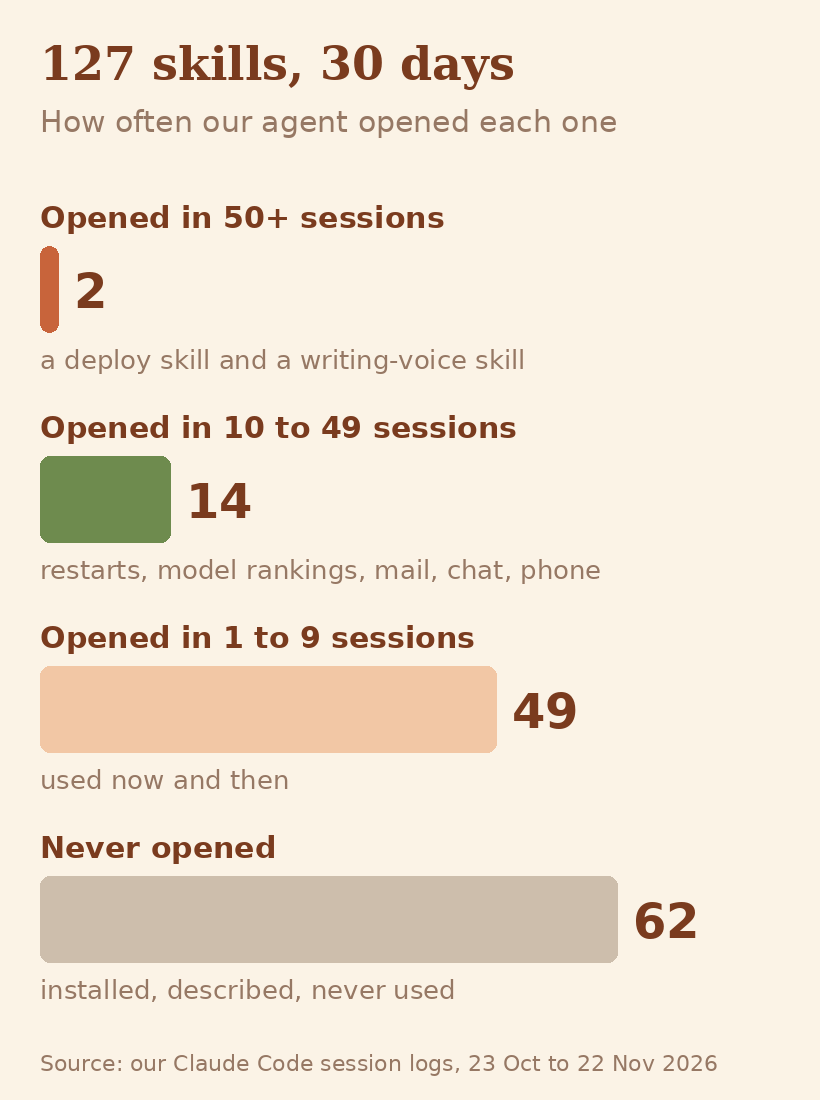
The top of the list is short, and every skill on it encodes a procedure that broke before it was written down.
A deploy skill
Our most used skill builds the agent’s own code in a clean copy, stages it, and restarts the gateway while live chats are held and resumed. It was opened in 303 sessions in 30 days. A restart typed by hand stops whatever chats are running; the skill holds each one and resumes it. The steps live in one file, so the model never improvises them.
A writing-voice skill
Every text meant for a person goes through a skill that sets the house style and ships a checker script, voicecheck.py, that flags phrasing readers spot as machine-written, and this post went through it. It was opened in 192 sessions, more than any skill except the deploy one, because writing happens in almost every session.
A long-job runner
Anything that runs longer than a couple of minutes, a build or a big download, goes through a skill that hosts it as a background service and wakes the session when it ends. It replaced the sleep-and-poll loops and ten-minute foreground waits the model used to write, which were the usual way those jobs went wrong. It sits in the personal skills folder and was opened in 159 sessions.
What these three share is a known way to fail. A skill is at its best as a written-down procedure for a job the model used to get wrong, not as general knowledge it already has.
The skills we removed, and why
One skill doing two jobs
A skill called marketplace-search scraped two classifieds sites. One worked over plain HTTP; the other was blocked and needed a real browser. One description had to cover both, so it could not say clearly when to use which. We split it into two skills, one per site, each with a description scoped to its own site: one skill, one job.
A duplicate of a better skill
We had a bundled youtube skill and a chatgpt-export skill. When their fuller versions, YouTube Ultimate and ChatGPT Exporter Ultimate, were published on ClawHub, we deleted the old ones. Two descriptions for the same request make the model choose, and nothing guarantees it picks the better one.
A guarantee only code can give
shell-security-ultimate asked the model to classify every shell command as safe, warning or critical before running it. Its own documentation said the enforcement was the agent following instructions, not a block, so we dropped it. A skill is advice the model reads; a guard has to be code that runs before the tool call, which is how TinkerClaw’s guards work.
The 62 that were never opened
They are still installed, and they are where the next cuts come from. Claude Code has two tools for this. /skill-doctor lists the skills that were never invoked along with their context cost. Setting disable-model-invocation: true in a skill’s frontmatter takes its description out of context while keeping /skill-name there for when you want it.
How to write a Claude Code skill in ten minutes
Here is a complete skill that turns the last week of git commits into release notes a user can read.
- Make the folder:
.claude/skills/release-notes/in a repo, or~/.claude/skills/release-notes/for every project. - Write
SKILL.mdwith a description that reads like a routing rule: what it does, then the words a person would use when they want it. - Pull live data in with a line that starts with an exclamation mark followed by a command in backticks, as in the example below. Claude Code runs the command and pastes the output before the model reads the skill.
- Test it with a plain request that does not name the skill.
.claude/skills/release-notes/SKILL.md

---
description: Writes user-facing release notes from recent git commits. Use when the user asks for release notes, a changelog entry, or "what shipped this week".
---

## Commits since last week

!`git log --since="7 days ago" --pretty=format:"- %s"`

## Instructions

1. Group the commits above under **New**, **Fixed** and **Under the hood**.
2. Rewrite each one for a user, not a developer: say what they can now do.
3. Drop `chore:` commits unless they change something a user sees.
4. End with one line naming the most important change.
We tested it on Claude Code 2.1.330 with the prompt “What shipped this week? I need something to paste in the newsletter.” The model called the skill on its own, grouped the commits under New and Fixed, left the chore: commit out, and the whole run, on the Haiku model, took 7.5 seconds for a file of 14 lines.
Claude Code skills best practices
- Put the use case first in the description. It is the only part the model sees until the skill is chosen, and it can be cut.
- Keep
SKILL.mdshort. Move long reference material into separate files the skill points to; they load only when read. - Let code do the exact work. Parsing, sorting and API calls belong in a bundled script; the skill says when to run it.
- Put safety in code. A flag the script reads will hold, where a sentence asking the model to be careful may not.
- One job per skill. If the description needs an “and also”, it is two skills.
Three real Claude Code skills examples from our catalog
All three are public on ClawHub and in the TinkerClaw repo.
Visual Tables: a skill that is only rules
Visual Tables makes the agent draw comparisons a person reads at a glance: five colour tiers that mean the same thing in every table, and bars measured against the best row. Nothing in it teaches the model a new ability. It writes down a preference so every table comes out the same way, and that consistency is the whole value.
YouTube Ultimate: a skill that wraps a script
YouTube Ultimate fetches transcripts and downloads videos through a Python script, with no API key and no quota. The SKILL.md tells the model when to call the script and with which arguments; the script does the work. It has more than 3,900 downloads on ClawHub, the most of any skill shown here.
WordPress Ultimate: a skill with the brakes in code
WordPress Ultimate lets an agent manage a WordPress site, and every new post lands as a draft. Publishing or editing live content is refused unless the call carries WP_ALLOW_PUBLISH=1, and every request is checked against a host allowlist before the password leaves the machine. The model cannot talk its way past a test the script runs, and this post was published through it.
FAQ
Where do Claude Code skills live?
Personal skills go in ~/.claude/skills/<name>/SKILL.md and load in every project on your machine. Project skills go in .claude/skills/<name>/SKILL.md inside a repo and load for everyone who works there. Plugins can also ship skills, which you call as /plugin-name:skill-name.
What is the difference between Claude Code skills and MCP?
A skill is instructions, and sometimes scripts, that teach the model a procedure; it loads only when needed. An MCP server connects the model to an outside system and adds tools to the session. Many setups use both: MCP to reach the data, a skill for how to handle it.
Do Claude Code skills use tokens when you are not using them?
Yes. The name and description of every skill sit in the context of every session. Only the body waits until the skill is used. A long description on a skill you never use is a cost on every turn.
How many Claude Code skills is too many?
When the listing passes its budget, 1% of the context window, Claude Code starts dropping descriptions, beginning with the skills you use least. Run /skill-doctor to see which skills were never invoked and what each one costs.
Can I use the same skills in OpenClaw?
Yes. OpenClaw reads the same SKILL.md folders, so a skill written for Claude Code works there too. Some frontmatter fields are Claude Code extensions, so look at those first if a skill behaves differently in another agent.
Skills in TinkerClaw
TinkerClaw, our open-source fork of OpenClaw, ships 122 skills in its public repo, and many of them are also on ClawHub. Every one came from a job we did more than once and wanted done the same way each time. I tinker with these all the time and bake a new skill in as soon as my day needs one.
You can click through the agent in the live demo. The skill behind this post’s writing has its own story in how we write with AI and still sound like ourselves, and the price of the plans these skills run on is in Claude Code pricing. To try Claude Code before paying for a plan, Claude Code free tests the free models it can run on.
For builders
- Prefrontal (PDF): recipes as written-down procedures the agent runs step by step; the idea behind The Claude Code skills that earn their place every day.
- Budget Prompting (PDF): what everything loaded on every turn costs, and how to cut it; behind What a Claude Code skill is, and what it costs before you use it.
- There are others, by topic, in the brain map and the site map.
Leave a Reply