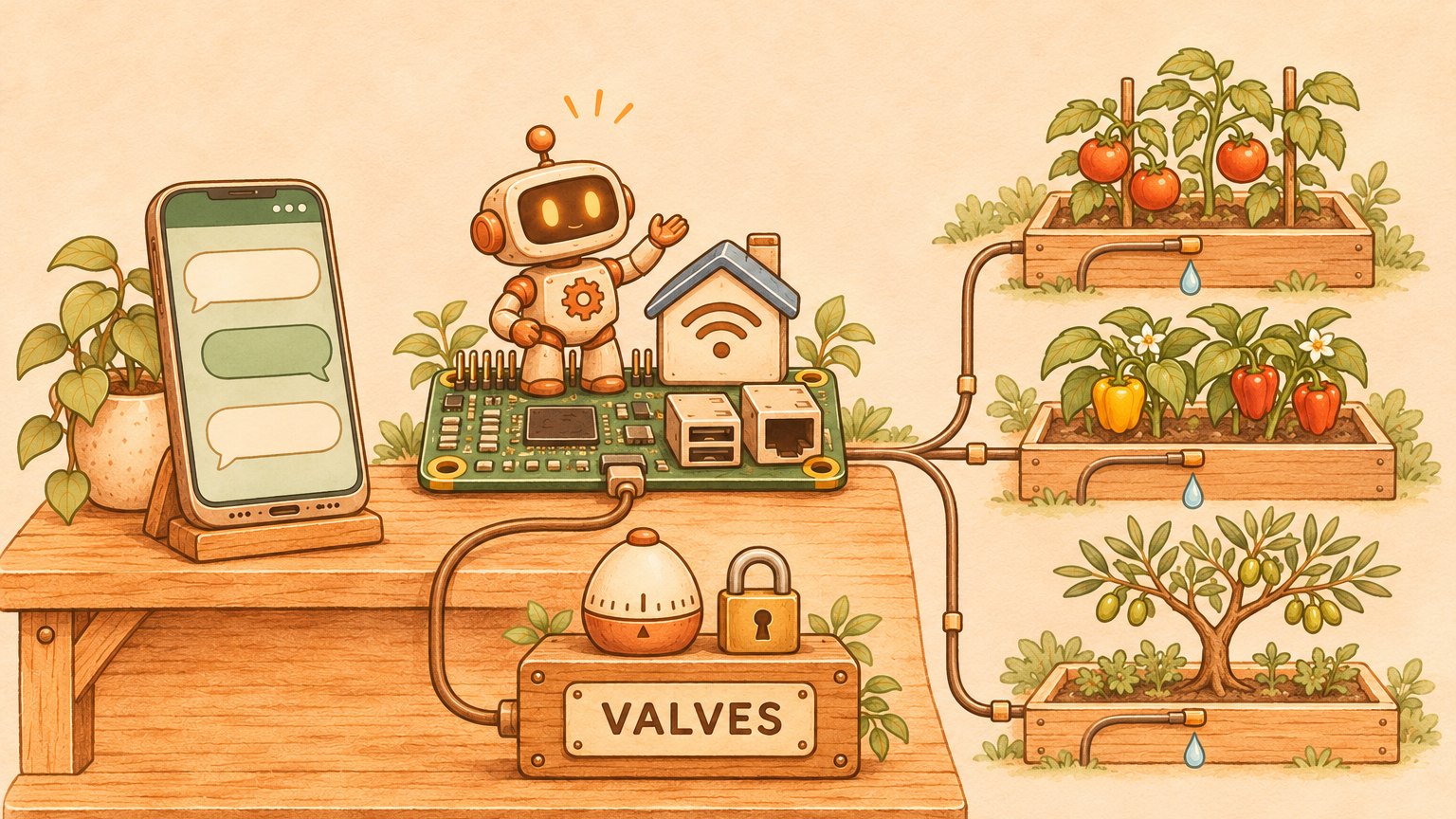

Can an AI run your Home Assistant? Yes, and you have two ways to do it. The built-in way: add a conversation agent from the OpenAI, Anthropic, Google or Ollama integration, expose the devices it may touch, and Assist controls them by voice or text. The outside way: an AI agent that lives in your chats, remembers what you told it last week and writes the automations itself. This post runs the second one for real: Home Assistant and an AI agent on one Raspberry Pi 5, watering a garden through ten relays.
Forum threads keep asking how the pieces fit, and the answers stop at “install the integration”. This post shows the whole setup, what each piece does, and the safety line that decides what the AI may never do: wherever it sits, the AI never gets the last word on a valve, a lock or a door.
What the official Home Assistant AI integration gives you
Start here, because it costs nothing and covers most homes. Home Assistant treats AI as building blocks you switch on one at a time:
- Conversation agents. The OpenAI, Anthropic, Google and Ollama integrations plug a model into Assist, so you can talk or type to your house from the app or a voice satellite. Ollama keeps the model on your own hardware. Each agent gets a set of AI tools: Device control only reaches the entities you expose, while the Home Assistant set “accesses everything and only works for administrators”, in the words of the Anthropic integration docs.
- Exposed entities. Assist can only see and control what you expose, and “Expose new entities” is on by default. Lights, switches and covers go in automatically, and covers include garage doors and gates. Locks, alarm panels and scripts never do.
- AI Tasks. The AI Task integration lets an automation use a model for one job: describe what a camera sees, generate an image, decide whether a delivery driver is at the door.
- The MCP server. The Model Context Protocol integration turns Home Assistant into an MCP server, so an outside AI app such as Claude, ChatGPT, Claude Code or Codex can read the state of your home and control devices. It signs in with OAuth and has a read-only mode.
That is a solid voice assistant with good manners. What it does not give you is an assistant that works on your home while you are away from it.
Where an outside AI agent goes further
An AI agent here means a program that runs all day on its own, keeps a memory, talks to you through your usual chats and can run commands on the machine it lives on. Think of Assist as a smart doorman who answers the intercom, and the agent as a handyman with keys to the workshop.
The handyman does three things the doorman cannot:
- It meets you where you already talk. You ask from WhatsApp or Telegram, with no Home Assistant app open. How an agent sits inside your chats is in plug your AI agent into your world, and what that means for WhatsApp in particular is in ChatGPT on WhatsApp in 2026.
- It remembers and follows up. “Water them like last Thursday” means something to it, and it can run its own scheduled checks, such as reading last night’s run before you wake up.
- It builds. It can write the YAML, save a dashboard through Home Assistant’s websocket API, and write the small service a new device needs. Our irrigation scheduler came out of that: seven routines, each starting at a set hour or after an earlier one finishes, with every start time and duration editable from one dashboard.
All that power has a price: an agent that builds dashboards needs an administrator long-lived access token, and that token can switch anything in the house. So the next question is where to put the limits.
The setup: Home Assistant and an AI agent on one Raspberry Pi
Everything below runs on a single board:
- The board. A Raspberry Pi 5 with 16 GB of RAM.
- Home Assistant. Version 2026.8.1, the Container install in Docker with host networking. It uses about 180 MB of RAM, so it leaves the rest of the Pi for the agent.
- The agent. The TinkerClaw gateway, on the same Pi. It reaches Home Assistant through its websocket and REST APIs with a token, the same way any script would, so no plugin sits in between. The chat model runs in the cloud; Ollama, also in Docker, holds the small embedding models the agent uses to search its memory.
- The relays. A ten-relay I²C HAT on the Pi’s header switches 24 V AC garden valves fed by their own transformer. Valve current never touches the Pi.
- The valve service. About 200 lines of Python that own the relay board. Home Assistant never touches the I²C bus; it calls this service over HTTP on the loopback address, and so does everything else.
The last piece is the one most guides skip, and it is where the safety line lives.
Irrigation with AI: put the safety line below the AI
Picture a kitchen tap with an egg timer welded to it. You can open it as wide as you like, but you cannot open it without winding the timer, and when the timer rings the water stops, whoever opened it. In this setup the tap is a garden valve, the timer is the valve service, and Home Assistant and the agent are only the hands.
The limits sit in three layers under Home Assistant, from the bottom up:
- The relay board. All relays are open, so all valves are shut, the moment it powers up. Its hardware watchdog shuts every valve if the Pi stops talking to it for 600 seconds, even with Linux hung.
- The valve service. There is no “open” without an end time. A request with no duration gets 15 minutes, and any request is cut to 120. When the service stops, it shuts everything on its way out, and when it starts it shuts everything first.
- The schedule in Home Assistant. It refuses any program that would run more than two valves at once, the most the transformer has been shown to carry.
The agent sits on top of all three. That is the point: it holds an administrator token, and none of these limits listen to tokens.

The layers have already earned their place. One night this November a schedule run stalled in Home Assistant: a step waited for a “done” signal that never came, for 15 hours, until its timeout ended the run. The two valves it had opened ran their 10 minutes and shut. The stall cost the other beds a night of watering and wasted no water.
Answering from a chat, and refusing what it should
A typical exchange with this setup looks like this one, which is invented; the limits in it are the real ones.
You: It was hot today, give the tomatoes half an hour.
Agent: Tomatoes on for 30 minutes, they shut at 21:42. The end time lives in the valve service, so they shut even if Home Assistant or I go down.
You: And leave the olive tree running all night.
Agent: No can do: every valve needs an end time and two hours is the ceiling. I can give it two hours now and another two at 3:00.
The agent says no because it knows the limit. If it forgot, the valve service would still cut the request to two hours. That is the rule for any AI agent in a smart home: if a wrong answer can cost water, money or a door, the refusal belongs in code or hardware, never only in the prompt.
Three habits keep the rest safe:
- Expose like you would to a guest. For the built-in agents, expose only what a guest could press. Unexpose garage doors and gates, since Home Assistant exposes covers by default, and leave locks and alarms out.
- Start an MCP client in read-only mode. Let it read the house for a week before it may switch anything.
- Hold the steps that cannot be undone. Unlocking a door or sending a message to someone outside the house cannot be taken back. A good agent pauses on exactly those and lets the rest through, which is what the reversibility gate does in TinkerClaw.
Which Home Assistant AI setup should you pick?
- You want to talk to your house: a conversation agent with Device control, and a short list of exposed entities.
- You want Claude or ChatGPT to read your home: the MCP server, read-only first.
- You want an assistant that lives in your chats and builds things: an outside agent on the same box, with the limits below Home Assistant in place before it gets a token.
FAQ
Does Home Assistant have built-in AI?
Yes. The OpenAI, Anthropic, Google and Ollama integrations add a conversation agent to Assist, AI Tasks let automations use a model for one job, and the Model Context Protocol integration lets outside AI apps connect. All of it is off until you set it up.
Can I use ChatGPT or Claude with Home Assistant?
Add the OpenAI or Anthropic integration and pick it as Assist’s conversation agent, or turn on the Model Context Protocol server and connect the Claude or ChatGPT app to it with OAuth.
Can Home Assistant AI run locally on a Raspberry Pi?
Home Assistant itself runs comfortably on a Raspberry Pi 5; ours uses about 180 MB of RAM. For a fully local assistant, the Ollama integration connects a model running on your own hardware. We keep only small embedding models on the Pi and send conversation to a cloud model; the trade-offs of buying hardware against paying per token are in AI costs in 2026.
What are Home Assistant AI tasks?
AI Tasks let an automation or script hand one job to a model: describe a camera snapshot, generate an image, or decide whether someone is at the door. You pick which AI integration powers them in the settings.
Is it safe to let an AI control Home Assistant?
It is as safe as the limits beneath it. Expose only what you would let a guest touch, start outside AI apps in read-only mode, and put hard limits, like end times on valves, in a service or in hardware the AI cannot change.
The agent behind this setup: TinkerClaw
The agent in this setup is TinkerClaw, our open-source fork of OpenClaw, and the Pi in the picture is the same box that keeps it running with the laptop shut, as described in laptop off, agent on. I tinker with this all the time, and every new need of the house goes into the code the day it shows up.
You can click through the agent in the live demo. How it learns which requests to stop is in a guard that learns when to stay quiet, and what a Pi like this costs to run all month is in OpenClaw cost per month.
For builders
- AEGIS (PDF): layered security for an agent that acts on the real world; the idea behind Irrigation with AI: put the safety line below the AI.
- There are others, by topic, in the brain map and the site map.
Leave a Reply