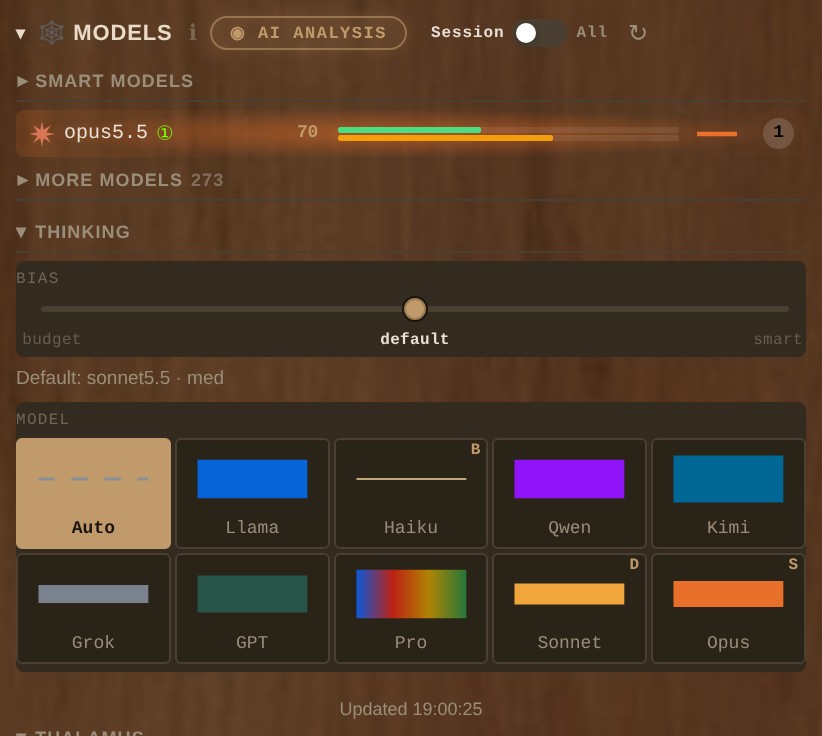
Why does an agent stop dead at a usage limit while other models you could use sit idle? You know the scene: halfway through a refactor, the reply turns into “You’ve reached your usage limit. Your limit resets at 4:10 PM.” That same morning, the same top model spent a minute of deep thinking on “thanks, that works”.

One model for everything costs twice
Most harnesses tie a chat to one model, and that choice costs you either way. Pick the strongest and you pay top price for every greeting, then hit the limit by lunch. Pick a cheap one and the hard task comes back half done, so you run it again. Open another app to reach another model and you leave the context behind and explain the task from the start.
The way out has two parts: any model inside the same chat, and one setting that lets each task find its own.
Any model, in the same chat

Every chat has a model picker, and it holds whatever you have set up: Claude, GPT, Grok and Gemini, and open models running on your own machine through Ollama, LM Studio or vLLM. TinkerClaw keeps OpenClaw’s provider plugins, more than fifty of them, so most vendors are already one config entry away.
The pick belongs to the chat. One tab can write code on Claude while the next drafts a reply to Northwind Supply on GPT. A model you choose by hand is never replaced, the way a clinic does not send another doctor when you booked Dr. Hale by name.
Auto: three stops and your suggestion
Choose Auto in the picker and the effort row turns into a dial with three stops: Budget, Default and Smart. A dial nobody has touched sits on Default. Right-click a model to suggest it for a stop, with an effort: a fast model at low effort for Default, say, and your strongest at max for Smart.
Think of a good waiter who knows your budget and your usual order. You get your usual, unless something on tonight’s menu suits the dish you asked for clearly better, and then the waiter tells you why. The usual is your suggestion, the menu is every model you have set up, and the waiter is Thalamus, TinkerClaw’s router. Every Auto turn starts from your suggestion, and the router’s card on the screen names the call it made: “kept your default suggestion”, or “moved off your default suggestion” followed by the reason.
Each task finds its model and its effort
Before a turn starts, Thalamus reads the prompt for the kind of work it asks for: code, maths, office work, research, security and more. It then checks a table of measured strength per kind of work, built from Epoch AI’s public benchmark results and refreshed by a routine that ships with the repo. When another model is measured better at this kind of work, the turn moves to it. At Smart any measured lead is enough. At Budget and Default the lead has to be large and the price has to stay in the stop’s range, because those stops are about money too.
A prompt with no clear kind of work, such as a plain question, stays on your suggestion, because nothing moves on a hunch.
The effort follows the task as well. At Budget and Default a greeting runs at low effort and a hard multi-part build gets the most the stop allows, with your suggested effort as the ceiling. At Smart the effort you set stands, since you picked Smart to get the best every time.
A usage limit no longer stops the chat
When a provider answers with a rate limit or a billing error, Thalamus marks that supply as cooling until the reset time the provider gave, or for 30 minutes when it gave none. The next turn goes to the best supply still open, and the card says so: “Opus is cooling until 16:20, so the next best runs.” The cooling list is a small file on disk, so a restart does not forget it, and once the reset time passes the supply is back in the running without you touching anything.
In one heavy week on our own install, more than a third of the Auto turns ran on the next-best model while the first choice was cooling, and the work went on.
Auto is also careful with money it cannot see. Google’s models bill per call, so Auto leaves them to your hand: they run when you pick them in the picker, and Auto sends them no turn of its own unless you turn that on.
Baked into TinkerClaw
All of this runs in TinkerClaw, the open-source agent harness that grew out of OpenClaw. I tinker with ideas like this all the time, and they go into the code the moment I hear of a good one or need something extra in my day. Why that is now cheap enough to do is the subject of from block to blob.
Next on the way in: moving between models from one step to the next inside a single turn. Thalamus already writes down the pick it would make for every model call, and letting that pick act is the next step.
For builders
- J19, MAESTRO: the paper behind Thalamus, on what routing and orchestration buy and what they cost in latency and supply. Behind Auto: three stops and your suggestion and A usage limit no longer stops the chat.
- J6, Round Table: why different model families are worth keeping at hand. Behind Any model, in the same chat.
- J12, Budget Prompting: where an always-on agent’s bill comes from and how to cut it. Behind Each task finds its model and its effort.
There are more papers, sorted by topic, in the brain map and the site map.
Related: Best AI for coding: what months of routing taught us about picking a model
Leave a Reply